Folders for Claude. Search by what was said.
Updated 2026-11-03 · by Josh, co-founder of Sortbase
The short version
Claude now lets you group chats inside Claude, and Projects hold new work around files and instructions, but both hold Claude chats only. To keep Claude chats in folders next to your ChatGPT, Gemini and Grok chats, install Sortbase, open the panel on claude.ai, create a folder and drag chats in. One search box covers all four.
7-day free trial. Cancel anytime.
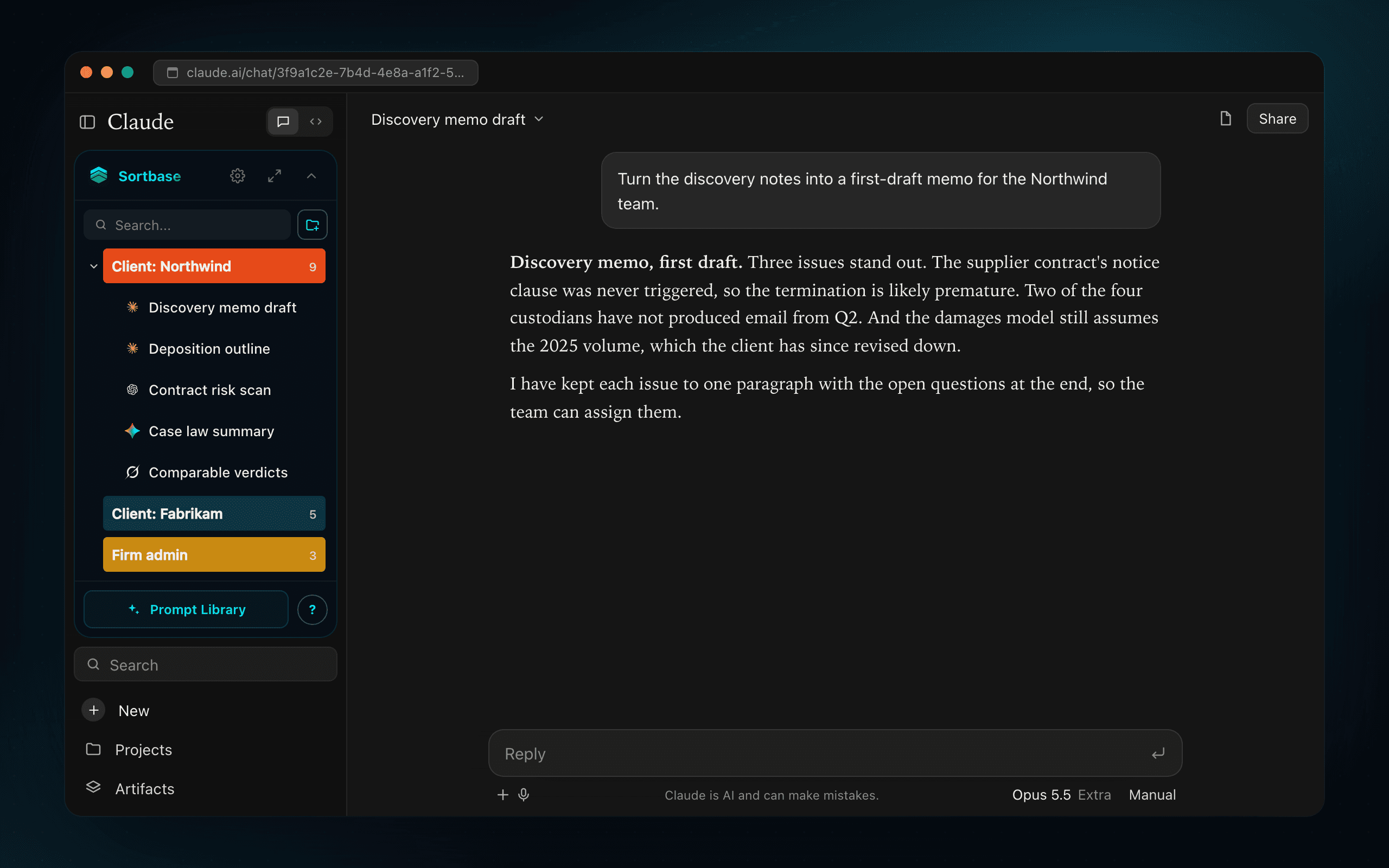
Five steps, about five minutes
Install Sortbase and open claude.ai
The panel appears in the Claude sidebar the moment the page loads. Sign in once; that is what lets folders and prompts follow you across devices and across the other three sites.
Make one folder for something live
A client, a matter, a project. Not a topic. Topic folders rot; project folders retire cleanly when the work ends.
Drag the chats that matter into it
Do the ten that would hurt to lose, not the whole backlog. Chats keep their source model, so a Claude memo and a ChatGPT draft can sit in the same folder.
Search by the phrase you remember
Each AI searches only its own chats. Sortbase searches what you filed on Claude, ChatGPT, Gemini and Grok from one box.
When Claude stops, move the thread
Limit reached, refusal, knowledge cutoff: the forward icon sends the whole conversation to another model as an attachment. You keep going; the original stays where it was.
Projects and groups are Claude-only
Claude Projects are workspaces: a set of new chats that share files and instructions. They are useful and Sortbase does not replace them. Claude has also started rolling out chat groups in its sidebar. Both hold Claude chats only, and a chat lives in one Project. Folders file what you already have, nest as deep as you like, and hold your ChatGPT, Gemini and Grok chats next to the Claude ones. Keep a Project per live engagement; put everything else in folders.
Hit your limit? Move the thread
When Claude hits a usage limit mid-task, many people carry the work to ChatGPT or Gemini by copy and paste. Sortbase sends the whole conversation in one click: pick the chat row, click the forward icon, choose the destination. The thread arrives as an attachment with everything that was said, and the new model picks up where you were. It moves the conversation, not Claude's memory or Project files, and it works in every direction between the four platforms.
What Sortbase stores
Sortbase saves your folders and prompts so they sync across your devices. If you stop paying, everything you filed stays browsable. Two of us run it from Austin and we answer every support email ourselves. Privacy policy.
FAQ
- Does Claude have folders?
- Claude now has chat groups on newer plans and layouts, and Projects for new work. Both hold Claude chats only. Sortbase's folders hold chats from ChatGPT, Claude, Gemini and Grok together, nest, and are searchable from one box.
- Are Sortbase folders the same as Claude Projects?
- No, and most people use both. Projects are for a set of new chats that share files and instructions. Folders are for filing the chats you already have, nesting them by client or project, and keeping the same tree across ChatGPT, Gemini and Grok. A chat can sit in a Sortbase folder and a Claude Project at the same time.
- Can I search the contents of my Claude chats?
- Yes, for every chat you file into Sortbase. Keyword search reads the contents, not just the title, and runs across all four platforms from one box. It does not replace Claude's own history search; it sits beside it.
- What happens when Claude says I have hit my usage limit?
- Open the chat row in the Sortbase panel, click the forward icon and choose ChatGPT, Gemini or Grok. The whole conversation lands in a new chat there as an attachment, so you can keep working. The original stays filed in its folder.
- What does Sortbase store?
- The chats you file or send to another AI, and the prompts you add, tied to your account so they sync across devices. Nothing else you type into Claude or the other three sites. If you stop paying, everything you filed stays browsable.
- How much does it cost?
- Free to install. 7-day free trial of every feature, card required, nothing charged during the trial. Then $10/month or $100/year. Cancel any time in the trial.
Folders, search and transfer on claude.ai
7-day free trial. Cancel anytime.
Also see Sortbase vs AI Toolbox.